The OpticalProperties attribute applies to a satellite-based tracking instrument or facility object. In the case of a satellite-based tracking instrument, the ODTK® software applies optical properties to space-based tracking where one satellite produces measurements of another satellite. OpticalProperties consists of the attributes below.
Target must be lit
Select true or false. If true, optical measurements, right ascension, and declination are only valid if the target satellite is illuminated by the Sun. The simulator does not generate such measurements, and the filter does not process them.
Space background required
Select true or false. If true, the ODTK software considers optical measurements, right ascension, and declination invalid if the line of sight from the tracking satellite to target satellite comes closer to the Earth than allowed by the MinGrazingAlt setting on the TrackingInstrument. The simulator does not generate such measurements, and the filter does not process them.
Polar exclusion
Enter an angle value for the PolarExclusion attribute. The ODTK software considers optical measurements, right ascension, and declination invalid if they are within the exclusion angle of either the north or south inertial poles. The simulator does not generate such measurements, and the filter does not process them.
Max sun elevation
Enter an angle value for the MaxSunElevation attribute. The ODTK software considers optical measurements, right ascension, and declination invalid if the elevation angle of the sun relative to the Facility is greater than the entered value. The simulator does not generate such measurements, and the filter does not process them.
Min sun exclusion
Enter an angle value for the MinSunExclusion attribute. The ODTK software considers optical measurements, right ascension, and declination invalid if the angle between the line of sight from the tracker to the satellite and direction of the sun relative to the tracker is less than the entered value. The simulator does not generate such measurements, and the filter does not process them.
Min moon exclusion
Enter an angle value for the MinMoonExclusion attribute. The ODTK software considers optical measurements, right ascension, and declination invalid if the angle between the line of sight from the tracker to the satellite and direction of the moon relative to the tracker is less than the entered value. The simulator does not generate such measurements, and the filter does not process them. This setting applies only for Earth-based trackers.
Min Earth exclusion
Enter an angle value for the MinEarthExclusion attribute. ODTK software considers optical measurements, right ascension, and declination invalid if the angle between the line-of-sight from the tracker to the satellite and direction of the Earth relative to the tracker is less than the entered value. The simulator does not generate such measurements, and the filter does not process them. This setting only applies for Moon-based trackers.
Max solar phase angle
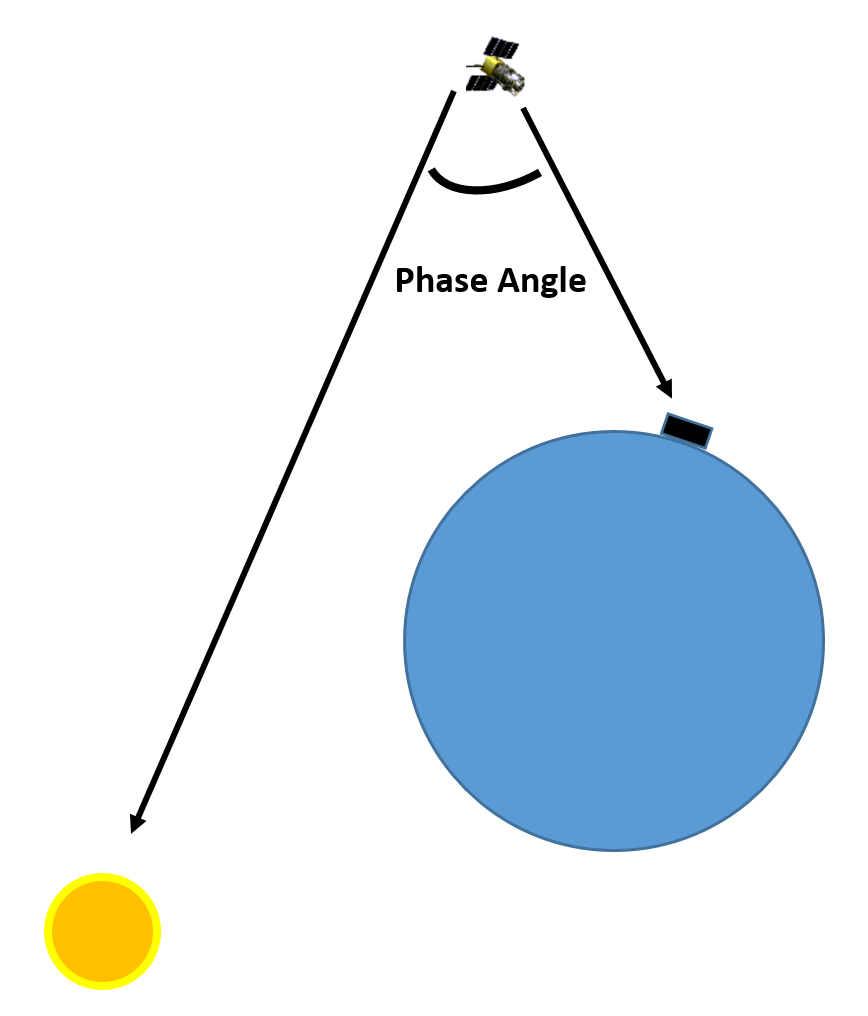
Enter an angle value for the MaxSolarPhaseAngle attribute. The ODTK software considers optical measurements, right ascension, and declination invalid if the calculated solar phase angle, measured as the angle between vector from the target satellite to the observer and the vector from the target satellite to the sun, is greater than the constraint value. The simulator does not generate such measurements, and the filter does not process them.
Add Attitude Uncertainty Deweighting
The Boolean attribute AddAttitudeUncertaintyDeweighting specifies whether or not ODTK processing considers attitude uncertainty to deweight Op Nav measurements. The default is false.
You can specify an amount of spherical attitude uncertainty in the satellite attitude properties. ODTK processing converts the attitude uncertainty to right-ascension and declination uncertainty, which is added to the measurement covariance. For details about the conversion process, see Technical Manuals.
Optical navigation camera
The OpNavCamera attribute applies to a satellite-based tracking instrument. For details on this attribute, see the Optical Navigation Camera help page.
Reference frame
Use the ReferenceFrame attribute to specify the reference frame of the right ascension and declination angles. The ODTK software uses this reference frame in the creation of simulated data and in the processing of data if the tracking data file does not explicitly specify the reference frame for the observations. Facilities located on bodies other than the Earth are limited to the selections of ICRF and MEME J2000.
| Reference Frames | |
|---|---|
| Frame | Description |
| ICRF | International Celestial Reference Frame |
| MEME B1950 | The mean equator and mean equinox of B1950 reference frame, based on FK4 |
| MEME J2000 | The mean equator and mean equinox of J2000 reference frame, based on FK5 |
| MEME Of Date | (mean of date) Defined by the mean equator and mean equinox of the observation epoch, based on FK5 |
| MEME Of Jan 0 | Defined by the mean equator and mean equinox of January 0 of the year of the observation, based on FK5 |
| MEME Of UTC 00:00 | Defined by the mean equator and mean equinox at zero hours on the UTC day of the observation epoch, based on FK5 |
| TEME Of Date | Defined by the true equator and mean equinox of the observation epoch, based on FK5 |
| TEME Of Jan0 | Defined by the true equator and mean equinox of January 0 of the year of the observation, based on FK5 |
| TEME Of UTC 00:00 | Defined by the true equator and mean equinox at zero hours on the UTC day of the observation epoch, based on FK5 |
| TETE Of Date | (true of date) Defined by the true equator and true equinox of the observation epoch, based on FK5 |
| TETE Of Jan0 | Defined by the true equator and true equinox of January 0 of the year of the observation, based on FK5 |
| TETE Of UTC 00:00 | Defined by the true equator and true equinox at zero hours on the UTC day of the observation epoch, based on FK5 |
Aberration corrections
Use the AberrationCorrections attribute to enter corrections for the ODTK software to apply in the processing of optical measurements. The ODTK software also applies aberration corrections to directional measurements (azimuth, elevation, face horizontal, face vertical, SB azimuth, SB elevation, X angle, Y angle) when the LightTimeDelay setting on the corresponding measurement statistics entry is set to true. If you disable LightTimeDelay on optical measurements, ODTK processing will still model the aberrational effects as indicated by this setting, to allow for flexibility when attempting to determine if tracking measurements were corrected prior to delivery for orbit determination. If aberration information goes through the tracking data interface, that information will override this setting.
| Aberration Correction Options | |
|---|---|
| Option | Description |
| All | Tells the ODTK software to correct observations for annual and diurnal aberration. |
| Annual | Tells the ODTK software to correct observations for annual aberration, assuming that diurnal aberration has been removed. |
| Diurnal | Tells the ODTK software to correct observations for diurnal aberration, assuming that annual aberration has been removed. |
| None | Specifies that observations have been previously corrected for all aberration effects. |
These settings may also be interpreted as the aberration effects to be added to measurements during simulation.