Scripting Basic Attribute Types
Most of the Ansys Orbit Determination Tool Kit (ODTK®) application attributes are simple scalar types that have equivalents in many programming languages.
You can learn about the type in the ODTK GUI. Right-click the attribute and then click "Attribute Information." A dialog box will pop up with the attribute type and additional information such as minimum and maximum constraints or allowed enumeration choices. The discussion of each type includes the appropriate syntax for setting and getting its value. Some of the attributes are grayed out, indicating that they are read only.
This topic provides short descriptions and ODTK-related code examples (COM and Cross-platform API) for the following basic types:
Type REAL
Real attributes are for unitless real numbers. Minimum and maximum constraints may apply.
COM
 VBScript
scen.OrbitClassifications.LEO.EccentricityMax = 0.15
ecc = scen.OrbitClassifications.LEO.EccentricityMaxscen.OrbitClassifications.LEO.EccentricityMax = 0.15;
var ecc = scen.OrbitClassifications.LEO.EccentricityMax;$scen->OrbitClassifications->LEO->{EccentricityMax} = 0.15;
$ecc = $scen->OrbitClassifications->LEO->EccentricityMax->{Value};scen.OrbitClassifications.LEO.EccentricityMax = 0.15
ecc = scen.OrbitClassifications.LEO.EccentricityMaxscen.invoke('OrbitClassifications').invoke('LEO').set('EccentricityMax', 0.15);
ecc = scen.invoke('OrbitClassifications').invoke('LEO').invoke('EccentricityMax').invoke('Value');Cross-Platform API
Python
scenario.OrbitClassifications.LEO.EccentricityMax = 0.15
eccentricity_max = scenario.OrbitClassifications.LEO.EccentricityMax.eval()
print(f'Eccentricity max: {eccentricity_max}')scenario.OrbitClassifications.LEO.EccentricityMax = 0.15;
eccentricityMax = scenario.OrbitClassifications.LEO.EccentricityMax;
fprintf("Eccentricity max: %f\n", eccentricityMax);scenario.get("OrbitClassifications.LEO.EccentricityMax").assign(0.15);
System.out.println("Eccentricity max: " + scenario.get("OrbitClassifications.LEO.EccentricityMax").asDouble());Type INT
These attributes are for integer values. Minimum and maximum constraints may apply.
COM
VBScript
scen.Filter("Filter1").Restart.MaxRecordsInFile = 200
maxrec = scen.Filter("Filter1").Restart.MaxRecordsInFilescen.Filter("Filter1").Restart.MaxRecordsInFile = 200;
var maxrec = scen.Filter("Filter1").Restart.MaxRecordsInFile;$scen->Filter("Filter1")->Restart->{MaxRecordsInFile} = 200;
$maxrec = $scen->Filter("Filter1")->Restart->MaxRecordsInFile->{Value};scen.Filter("Filter1").Restart.MaxRecordsInFile = 200
maxrec = scen.Filter("Filter1").Restart.MaxRecordsInFilescen.invoke('Filter').invoke('Filter1').invoke('Restart').set('MaxRecordsInFile', 200);
maxrec = scen.invoke('Filter').invoke('Filter1').invoke('Restart').invoke('MaxRecordsInFile').invoke('Value');Cross-Platform API
Python
scenario.Measurements.LookAheadBufferSize = 200
look_ahead_buffer_size = scenario.Measurements.LookAheadBufferSize.eval()
print(f'Measurements look ahead buffer size: {look_ahead_buffer_size}')scenario.Measurements.LookAheadBufferSize = 200;
lookAheadBufferSize = scenario.Measurements.LookAheadBufferSize;
fprintf("Measurements look ahead buffer size: %i\n", lookAheadBufferSize);scenario("Measurements")("LookAheadBufferSize").Assign(200);
std::cout << "Measurements look ahead buffer size: " << scenario("Measurements")("LookAheadBufferSize").AsInt() << "\n";scenario.get("Measurements.LookAheadBufferSize").assign(200);
System.out.println( "Measurements look ahead buffer size: " + scenario.get("Measurements.LookAheadBufferSize").asInt());Type BOOL
Boolean attributes accept values of true and false, where false = 0 and true = 1.
COM
VBScript
scen.Filter("Filter1").Output.SmootherData.Generate = true
genflag = scen.Filter("Filter1").Output.SmootherData.Generatescen.Filter("Filter1").Output.SmootherData.Generate = true;
var genflag = scen.Filter("Filter1").Output.SmootherData.Generate;$scen->Filter("Filter1")->Output->SmootherData->{Generate} = 1;
$genflag = $scen->Filter("Filter1")->Output->SmootherData->Generate->{Value};scen.Filter("Filter1").Output.SmootherData.Generate = True
genflag = scen.Filter("Filter1").Output.SmootherData.Generatescen.invoke('Filter').invoke('Filter1').invoke('Output').invoke('SmootherData').set('Generate', true);
genflag = scen.invoke('Filter').invoke('Filter1').invoke('Output').invoke('SmootherData').invoke('Generate').invoke('Value');Cross-Platform API
Python
filter1 = scenario.Filter['Filter1']
filter1.Output.SmootherData.Generate = True
generate = filter1.Output.SmootherData.Generate.eval()
print(f'Generate: {generate}')filter1 = scenario.Filter{"Filter1"};
filter1.Output.SmootherData.Generate = true;
generate = filter1.Output.SmootherData.Generate;
fprintf("Generate: %s\n", string(generate));const agi::odtk::AttrProxy filter1 = scenario("Filter")["Filter1"];
filter1("Output")("SmootherData")("Generate").Assign(true);
std::cout << "Generate: " << BoolToString(filter1("Output")("SmootherData")("Generate").AsBool()) << "\n";AttrProxy filter1 = scenario.get("Filter[‘Filter1’]”);
filter1.get("Output.SmootherData.Generate").assign(true);
System.out.println( "Generate: " + filter1.get("Output.SmootherData.Generate").AsBool() );Type STRING
An example of a string is a "Description" field, which is available on all ODTK objects.
COM
MATLAB
scen.set('Description', 'This is an example ...');
str = scen.invoke('Description').invoke('Value');Cross-Platform API
Python
scenario.Description = 'This is an example ...'
scenario_description = scenario.Description.eval()
print(f'Scenario description: {scenario_description}')scenario.Description = "This is an example ...";
scenarioDescription = scenario.Description;
fprintf("Scenario description: %s\n", scenarioDescription);scenario("Description").Assign("This is an example ...");
std::cout << "Scenario description: " << scenario("Description").AsString() << "\n";scenario.get("Description").assign("This is an example ...");
System.out.println("Scenario description: " + scenario("Description").asString() );Type STRING ENUMERATION
This type of STRING attribute can only accept a specific predefined set of values. For instance, Filter.StartMode can only be "Initial", "Restart", or "AutoRestart".
COM
VBScript
if scen.Filter("Filter1").ProcessControl.StartMode = "Initial" then
scen.Filter("Filter1").ProcessControl.StartMode = "AutoRestart"
end ifif (scen.Filter("Filter1").ProcessControl.StartMode == "Initial")
{
scen.Filter("Filter1").ProcessControl.StartMode = "AutoRestart";
}if ($scen->Filter("Filter1")->ProcessControl->StartMode->{Value} eq "Initial" )
{
$scen->Filter("Filter1")->ProcessControl->{StartMode} = "AutoRestart";
}if scen.Filter("Filter1").ProcessControl.StartMode.value == "Initial":
scen.Filter("Filter1").ProcessControl.StartMode = "AutoRestart"If strcmp(scen.invoke('Filter').invoke('Filter1').invoke('ProcessControl').invoke('StartMode').invoke('Value'), 'Initial')
scen.invoke('Filter').invoke('Filter1').invoke('ProcessControl').set('StartMode', 'AutoRestart')
endCross-Platform API
Python
if filter1.ProcessControl.StartMode.eval() == 'Initial':
filter1.ProcessControl.StartMode = 'AutoRestart'
print(f'Filter process control start mode: {filter1.ProcessControl.StartMode.eval()}')if filter1.ProcessControl.StartMode == "Initial"
filter1.ProcessControl.StartMode = "AutoRestart";
end
fprintf("Filter process control start mode: %s\n", filter1.ProcessControl.StartMode);if (filter1("ProcessControl")("StartMode").AsString() == "Initial")
{
filter1("ProcessControl")("StartMode").Assign("AutoRestart");
}
std::cout << "Filter process control start mode: " << filter1("ProcessControl")("StartMode").AsString() << "\n";if (filter1.get("ProcessControl.StartMode").asString().equals("Initial"))
{
filter1.get("ProcessControl.StartMode").assign("AutoRestart");
}
System.out.println( "Filter process control start mode: " + filter1("ProcessControl.StartMode").asString() );To get the list of valid enumeration choices, right-click the attribute and open the Attribute Information dialog or use the Scripting Tool's "Props" function. Alternatively, you can retrieve the list in your script via the Choices() property.
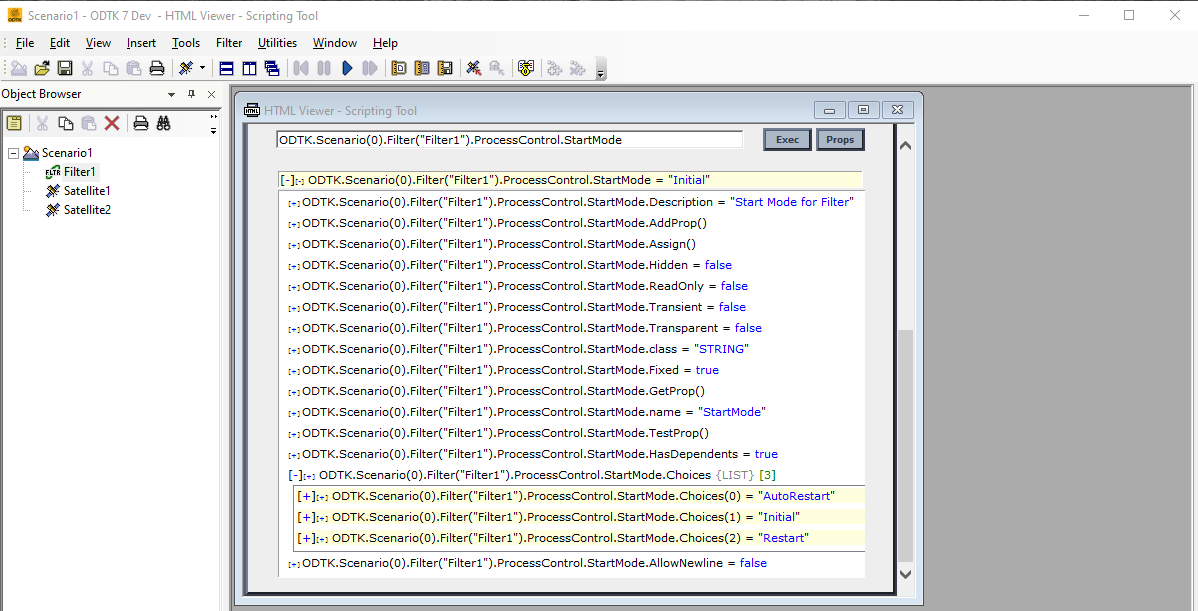
COM
VBScript
set proc = scen.Filter(0).ProcessControl
for each sChoice in proc.StartMode.Choices
MsgBox sChoice
next
proc.StartMode = proc.StartMode.Choices(0) ' sets AutoRestart modevar proc = scen.Filter(0).ProcessControl;
for(let i = 0; i < proc.StartMode.Choices.Count; i++)
{
alert(proc.StartMode.Choices(i));
}
proc.StartMode = proc.StartMode.Choices(0) // sets AutoRestart mode$proc = $scen->Filter(0)->ProcessControl;
$coll = $proc->StartMode->Choices;
foreach $sChoice ( in $coll)
{
Win32::MsgBox "$sChoice";
}
$proc->{StartMode} = $proc->StartMode->Choices(0)->{Value};proc = scen.Filter(0).ProcessControl
for sChoice in proc.StartMode.Choices:
print(sChoice)
proc.StartMode = proc.StartMode.Choices(0)proc = scen.invoke('Filter').invoke('Item', 0).invoke('ProcessControl');
coll = proc.invoke('StartMode').invoke('Choices');
size = coll.invoke('Size').invoke('Value');
for i = 0:size - 1
choice = coll.invoke('Item', i);
fprintf('%s\n', choice.invoke('Value'));
end;
proc.set('StartMode', proc.invoke('StartMode').invoke('Choices').invoke('Item', 0));
One special case of string enumeration is the SelectedRestartTime for a filter or simulator. The choices in this case change based on each filter or simulator run, and the choices contain a list of date and time strings with units of UTCG or GPSG. The scenario date units setting scen.Units.DateFormat determines the units. When setting the SelectedRestartTime in a script, any of the formats in the examples below will work if you do not define the units. The ODTK application assumes that the input date string is in the scenario units. If the restart time that you set is not a valid restart time, then the SelectedRestartTime will not be set.
COM
VBScript
set fil = scen.Filter(0)
MsgBox "Scenario default units are: " & scen.Units.DateFormat
fil.ProcessControl.SelectedRestartTime = "1 Jan 2006 00:10:00.000 UTCG"
fil.ProcessControl.SelectedRestartTime = "1 Jan 2006 00:10:00"var fil = scen.Filter(0);
alert("Scenario default units are: " + scen.Units.DateFormat.vaalue());
fil.ProcessControl.SelectedRestartTime = "1 Jan 2006 00:10:00.000 UTCG";
fil.ProcessControl.SelectedRestartTime = "1 Jan 2006 00:10:00";my $fil = $scen->Filter(0);
my $units = $scen->Units->DateFormat->{Value};
Win32::MsgBox "Scenario default units are: $units";
$fil->ProcessControl->{SelectedRestartTime} = "1 Jul 2006 13:00:00.000 UTCG";
$fil->ProcessControl->{SelectedRestartTime} = "1 Jul 2006 13:00:00";fil = scen.Filter(0)
print("Scenario default units are: " + str(scen.Units.DateFormat))
fil.ProcessControl.SelectedRestartTime = "1 Jan 2006 00:10:00.000 UTCG"
fil.ProcessControl.SelectedRestartTime = "1 Jan 2006 00:10:00"fil = scen.invoke('Filter').invoke('Item', 0);
units = scen.invoke('Units').invoke('DateFormat').invoke('Value');
fprintf('Scenario default units are: %s', units);
fil.invoke('ProcessControl').set('SelectedRestartTime', '1 Jul 2008 13:00:00.000 UTCG');
fil.invoke('ProcessControl').set('SelectedRestartTime', '1 Jul 2008 13:00:00.000');Cross-Platform API
Python
simulator = odtk.application.createObj(scenario, 'Simulator', 'Simulator1')
tracking_system = odtk.application.createObj(scenario, 'TrackingSystem', 'TrackingSystem1')
facility = odtk.application.createObj(tracking_system, 'Facility', 'Facility1')
if not simulator.Go():
print('Simulator run failed.')
exit()
filter1.ProcessControl.StartMode = 'Initial'
if not filter1.Go():
print('Filter run failed.')
exit()
last_selected_restart_time = ''
print('Selected restart time choices')
for selected_restart_time in filter1.ProcessControl.SelectedRestartTime.Choices:
last_selected_restart_time = selected_restart_time.eval()
print(f' {last_selected_restart_time}')
print(f'Scenario default units are: {scenario.Units.DateFormat.eval()}')
print('SelectedRestartTime will be set to ' + last_selected_restart_time)
filter1.ProcessControl.SelectedRestartTime = last_selected_restart_time
print(f'SelectedRestartTime was set to {filter1.ProcessControl.SelectedRestartTime.eval()}')simulator = odtk.application.createObj(scenario, "Simulator", "Simulator1");
trackingSystem = odtk.application.createObj(scenario, "TrackingSystem", "TrackingSystem1");
facility = odtk.application.createObj(trackingSystem, "Facility", "Facility1");
if ~simulator.Go()
fprintf("Simulator run failed.\n");
exit();
end
filter1.ProcessControl.StartMode = "Initial";
if ~filter1.Go()
fprintf("Filter run failed.\n")
exit();
end
lastSelectedRestartTime = "";
selectedRestartTimesChoices = filter1.ProcessControl.SelectedRestartTime.Choices;
fprintf("Selected restart time choices\n");
for i = 0: selectedRestartTimesChoices.Count-1
lastSelectedRestartTime = selectedRestartTimesChoices{i};
fprintf(" %i. %s\n", i, lastSelectedRestartTime);
end
fprintf("Scenario default units are: %s\n", scenario.Units.DateFormat);
fprintf("SelectedRestartTime will be set to %s\n", lastSelectedRestartTime);
filter1.ProcessControl.SelectedRestartTime = lastSelectedRestartTime;
fprintf("SelectedRestartTime was set to %s\n", filter1.ProcessControl.SelectedRestartTime);const agi::odtk::AttrProxy startModeChoices = filter1("ProcessControl")("StartMode")("Choices");
std::cout << "Start mode choices\n";
for (int i = 0; i < startModeChoices("Count").AsInt(); ++i)
{
std::cout << " " << i << ". " << startModeChoices[i].AsString() << "\n";
}
// One special case of the string enumeration is the SelectedRestartTime for a filter or simulator.
// The choices in this case change based on each filter or simulator run, and the choices contain a list of date / time
// strings with units of UTCG or GPSG.The units are determined by the scenario date units setting
// scenario.Units.DateFormat.
// When setting the SelectedRestartTime in a script, any of the following formats will work; if no units are defined,
// the input date string will be assumed to be in the scenario units. If the restart time that you set is not a valid
// restart time, then the SelectedRestartTime will not be set.
const auto simulator = odtk("application")("createObj").InvokeAttrProxy(scenario, "Simulator", "Simulator1");
const auto trackingSystem = odtk("application")("createObj").InvokeAttrProxy(scenario, "TrackingSystem", "TrackingSystem1");
const auto facility = odtk("application")("createObj").InvokeAttrProxy(trackingSystem, "Facility", "Facility1");
if (!simulator("Go").InvokeBool())
{
std::cout << "Simulator run failed.\n";
return;
}
filter1("ProcessControl")("StartMode").Assign("Initial");
if (!filter1("Go").InvokeBool())
{
std::cout << "Filter run failed.\n";
return;
}
std::string lastSelectedRestartTime;
const agi::odtk::AttrProxy selectedRestartTimesChoices = filter1("ProcessControl")("SelectedRestartTime")("Choices");
std::cout << "Selected restart time choices\n";
for (int i = 0; i < selectedRestartTimesChoices("Count").AsInt(); ++i)
{
lastSelectedRestartTime = selectedRestartTimesChoices[i].AsString();
std::cout << " " << i << ". " << lastSelectedRestartTime << "\n";
}
std::cout << "Scenario default units are: " << scenario("Units")("DateFormat").AsString() << "\n";
std::cout <<"SelectedRestartTime will be set to " << lastSelectedRestartTime << "\n";
filter1("ProcessControl")("SelectedRestartTime").Assign(lastSelectedRestartTime);
std::cout << "SelectedRestartTime was set to " << filter1("ProcessControl")("SelectedRestartTime").AsString() << "\n";AttrProxy simulator = odtk.get("application.createObj").invokeAttr(scenario, "Simulator", "Simulator1");
AttrProxy trackingSystem = odtk.get("application.createObj").invokeAttr(scenario, "TrackingSystem", "TrackingSystem1");
AttrProxy facility = odtk.get("application.createObj").invokeAttr(trackingSystem, "Facility", "Facility1");
if (!simulator.get("Go").invokeBool()) {
System.out.println("Simulator run failed.");
return;
}
filter1.get("ProcessControl.StartMode").assign("Initial");
if (!filter1.get("Go").invokeBool()) {
System.out.println("Filter run failed.");
return;
}
String lastSelectedRestartTime = "";
System.out.println("Selected restart time choices: ");
IterProxy restartTimes = filter1.get("ProcessControl.SelectedRestartTime.Choices").asIterProxy();
while (restartTimes.hasNext()) {
lastSelectedRestartTime = restartTimes.next().asString();
System.out.println(" " + lastSelectedRestartTime);
}
System.out.println("Scenario default units are: " + scenario.get("Units.DateFormat").asString());
System.out.println("SelectedRestartTime will be set to " + lastSelectedRestartTime);
filter1.get("ProcessControl.SelectedRestartTime").assign(lastSelectedRestartTime);
System.out.println("SelectedRestartTime was set to " + filter1.get("ProcessControl.SelectedRestartTime").asString());