Using the Scripting Tool
The Scripting Tool utility is available from the Utilities menu. You can use it to examine the Ansys Orbit Determination Tool Kit (ODTK®) object hierarchy and to execute Javascript code as a means for prototyping.
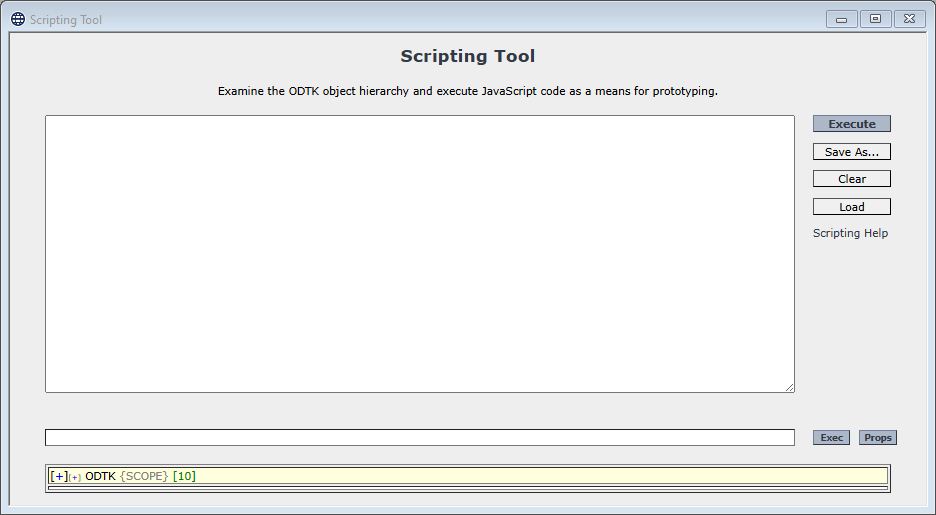
Executing scripts
In the blank text space of the Scripting Tool, you can write Javascript code. You have the following options available on the right:
| Option | Description |
|---|---|
| Click this button to execute the code that you have in the text box. | |
| Click this button to save the code you wrote to a JS file in the directory of your choice. | |
| Click this button to erase all the code you have in the text box. | |
| Click this button to load a JS file of your choice into the text box. | |
| Scripting Help | Click this link to go to the Scripting Attributes section of the ODTK Help. |
Accessing subobjects
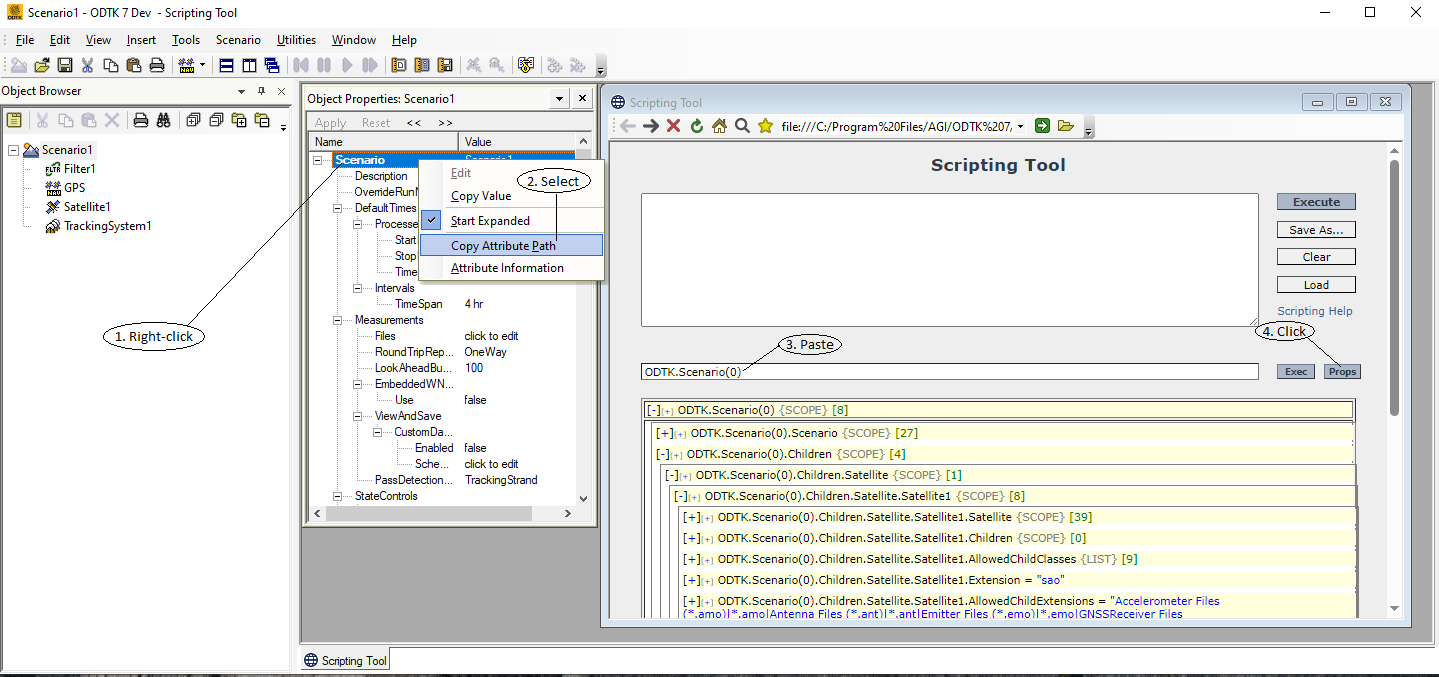
Starting with the ODTK root object, each object provides access to its subobjects via the Children scope. The following image demonstrates four steps of how to access the attribute path of a scenario and see its subobjects.
As a side effect of the ODTK application supporting various languages, there is more than one way to get access to the same object. For instance, you could refer to "Sat1" in the following ways:
COM
 JScript
var scen = ODTK.Scenario(0); // There's only one scenario
var sat = scen.Sat1; // Not very portable if you rename your satellite
var sat = scen.Satellite(0); // Gets the first satellite in the scenario
var sat = scen.Satellite("Sat1");
var sat = scen.Children.Satellite(0);
var sat = scen.Children("Satellite")(0); my $scen = $ODTK->Scenario(0);
my $sat = $scen->Satellite(0);
$sat = $scen->Satellite("Sat1");
$sat = $scen->Children->Satellite(0);
$sat = $scen->Children("Satellite")(0); scen = ODTK.Scenario(0)
sat = scen.Sat1
sat = scen.Satellite(0)
sat = scen.Satellite("Sat1")
sat = scen.Children.Satellite(0)
sat = scen.Children("Satellite")(0) scen = odtk.invoke('Scenario').invoke('Item', 0);
sat = scen.invoke('Sat1')
sat = scen.invoke('Satellite').invoke('Sat1');
sat = scen.invoke('Satellite').invoke('Item', 0);
sat = scen.invoke('Satellite').invoke('Sat1');
sat = scen.invoke('Children').invoke('Satellite').invoke('Item', 0); Cross-Platform API
Python
scenario = odtk.scenario[0]
satellite = scenario.mySat
print(f"Satellite name using scenario.mySat: {satellite.name.eval()}")
satellite = scenario.Satellite[0]
print(f"Satellite name using scenario.Satellite[0]: {satellite.name.eval()}")
satellite = scenario.Satellite[zeroth_satellite_name]
print(f"Satellite name using scenario.Satellite[\'{zeroth_satellite_name}\']: {satellite.name.eval()}")
satellite = scenario.Children.Satellite[0]
print(f"Satellite name using scenario.Children.Satellite[0]: {satellite.name.eval()}")
satellite = scenario.Children['Satellite'][0]
print(f"Satellite name using scenario.Children[\'Satellite\'][0]: {satellite.name.eval()}")
satellite = scenario.Children['Satellite'].Item[0]
print(f"Satellite name using scenario.Children[\'Satellite\'].Item[0]: {satellite.name.eval()}"")
satellite = scenario.Children['Satellite'].Item[zeroth_satellite_name]
print(f"Satellite name using scenario.Children[\'Satellite\'].Item[\'{zeroth_satellite_name}\']: {satellite.name.eval()}")
satellite = scenario.Children['Satellite'].ItemByName[zeroth_satellite_name]
print(f"Satellite name using scenario.Children[\'Satellite\'].ItemByName[\'{zeroth_satellite_name}\']: {satellite.name.eval()}") scenario = odtk.scenario{0};
satellite = scenario.mySat;
fprintf("Satellite name using scenario.mySat: %s\n", satellite.name);
satellite = scenario.Satellite{0};
fprintf("Satellite name using scenario.Satellite{0}: %s\n", satellite.name);
satellite = scenario.Satellite{zerothSatelliteName};
fprintf("Satellite name using scenario.Satellite{""%s""} : %s\n", zerothSatelliteName, satellite.name);
satellite = scenario.Children.Satellite{0};
fprintf("Satellite name using scenario.Children.Satellite{0}: %s\n", satellite.name);
satellite = scenario.Children{"Satellite"}{0};
fprintf("Satellite name using scenario.Children{""Satellite""}{0}: %s\n", satellite.name);
satellite = scenario.Children{"Satellite"}.Item{0};
fprintf("Satellite name using scenario.Children{""Satellite""}.Item{0}: %s\n", satellite.name);
satellite = scenario.Children{"Satellite"}.Item{zerothSatelliteName};
fprintf("Satellite name using scenario.Children{""Satellite""}.Item{%s}: %s\n", zerothSatelliteName, satellite.name);
satellite = scenario.Children{"Satellite"}.ItemByName{zerothSatelliteName};
fprintf("Satellite name using scenario.Children{""Satellite""}.ItemByName{""%s""}: %s\n", zerothSatelliteName, satellite.name);const agi::odtk::AttrProxy scenario = odtk("scenario")[0];
std::cout << R"(Satellite name using scenario(")" << zerothSatelliteName << R"()): )" << scenario(zerothSatelliteName)("name").AsString() << "\n";
std::cout << R"(Satellite name using scenario("Satellite")[0]: )" << scenario("Satellite")[0]("name").AsString() << "\n";
std::cout << R"(Satellite name using scenario("Satellite")(")" << zerothSatelliteName << "\"): " << scenario("Satellite")(zerothSatelliteName)("name").AsString() << "\n";
std::cout << R"(Satellite name using scenario("Children")("Satellite")[0]: )" << scenario("Children")("Satellite")[0]("name").AsString() << "\n";
std::cout << R"(Satellite name using scenario("Children")("Satellite")("Item")[0]: )" << scenario("Children")("Satellite")("Item")[0]("name").AsString() << "\n";
std::cout << R"(Satellite name using scenario("Children")("Satellite")("Item")[")" << zerothSatelliteName << R"("]: )" << scenario("Children")("Satellite")("Item")[zerothSatelliteName]("name").AsString() << "\n";
std::cout << R"(Satellite name using scenario("Children")("Satellite")("ItemByName")[")" << zerothSatelliteName << R"("]: )" << scenario("Children")("Satellite")("ItemByName")[zerothSatelliteName]("name").AsString() << "\n";AttrProxy scenario = odtk.get("Scenario[0]");
AttrProxy satellite = scenario.get("mySat");
System.out.println("Satellite name using scenario.get(\"mySat\"): " + satellite.get("name").asString());
satellite = scenario.get("Satellite[0]");
System.out.println("Satellite name using scenario.get(\"Satellite[0]\"): " + satellite.get("name").asString());
satellite = scenario.get("Satellite[" + zerothSatelliteName + "]");
System.out.println("Satellite name using scenario.get(\"Satellite[" + zerothSatelliteName + "]): " + satellite.get("name").asString());
satellite = scenario.get("Children.Satellite[0]");
System.out.println("Satellite name using scenario.get(\"Children.Satellite[0]\"): " + satellite.get("name").asString());
satellite = scenario.get("Children['Satellite'][0]");
System.out.println("Satellite name using scenario.get(\"Children['Satellite'][0]\"): " + satellite.get("name").asString());
satellite = scenario.get("Children['Satellite'].Item(0)");
System.out.println("Satellite name using scenario.get(\"Children['Satellite'].Item(0)\"): " + satellite.get("name").asString());
satellite = scenario.get("Children['Satellite'].Item(" + zerothSatelliteName + ")");
System.out.println("Satellite name using scenario.get(\"Children['Satellite'].Item(" + zerothSatelliteName + ")\"): " + satellite.get("name").asString());
satellite = scenario.get("Children['Satellite']").getItem(zerothSatelliteName);
System.out.println("Satellite name using scenario.get(\"Children['Satellite']\").getItem(" + zerothSatelliteName + ")\"): " + satellite.get("name").asString());
Use Children to test if there are any objects, and then use class name to access them. For example, to display the names of each of the satellites in your scenario, you could use the following:
COM
JScript
var Shell = new ActiveXObject("WScript.Shell");
if (ODTK.Children.Count == 0)
{
Shell.Popup("No scenario exists.");
}
else
{
var i;
for(i = 0; i < ODTK.Scenario(0).Children("Satellite").Count; i++)
{
Shell.Popup(ODTK.Scenario(0).Children("Satellite")(i).name);
}
} if ($ODTK->Children->{Count} == 0)
{
Win32::MsgBox("No scenario exists.");
}
else
{
# You must define the collection first before using
# it with the "in" keyword.
my $coll = $ODTK->Scenario(0)->Children("Satellite");
foreach my $sat (in $coll)
{
Win32::MsgBox($sat->{name}->{Value});
}
}if ODTK.Children.Count == 0:
print("No scenario exists.")
else:
for sat in ODTK.Scenario(0).Children("Satellite"):
print(sat.name) if odtk.invoke('Children').invoke('Count') == 0
error('No scenario exists.');
else
scen = odtk.invoke('Scenario').invoke('Item', 0);
fprintf('%s\n', scen.invoke('name').invoke('Value'));
coll = scen.invoke('Children').invoke('Satellite');
size = coll.invoke('Size').invoke('Value');
for i = 0:size - 1
sat = coll.invoke('Item', i);
fprintf('%s\n', sat.invoke('name').invoke('Value'));
end;
end Cross-Platform API
Python
# To display the names of each of the satellites in your scenario you could use the following:
print('Names of satellites in the scenario:')
for satellite in odtk.scenario[0].Children['Satellite']:
print(f' {satellite.name.eval()}')% To display the names of each of the satellites in your scenario you could use the following:
fprintf("Names of satellites in the scenario:\n")
satellites = odtk.scenario{0}.children{"Satellite"};
for i = 0: satellites.Count-1
fprintf(" %i. %s\n", i, satellite.name);
end // To display the names of each of the satellites in your scenario you could use the following :
std::cout << "Names of satellites in the scenario:\n";
const agi::odtk::AttrProxy satellites = scenario("children")("Satellite");
for (int i = 0; i <; satellites("Count").AsInt(); ++i)
{
std::cout << " " << i << "." << satellites[i]("name").AsString() << "\n";
} // To display the names of each of the satellites in your scenario you could use the following :
System.out.println("Names of satellites in the scenario:");
IterProxy satellites = scenario.get("Children[‘Satellite’]").asIterProxy();
int i = 0;
while(satellites.hasNext()) {
System.out.println(" " + i + “.” + satellites.next().get(“name”).asString());
i++;
}