STK Ephemeris File Format (*.e)
An STK ephemeris file is an ASCII text file that ends in a .e extension, formatted for compatibility with the Ansys Systems Tool Kit� (STK�) application. You can also use this format in the Ansys Orbit Determination Tool Kit (ODTK�) application. STK ephemeris files are useful when you need to provide the STK or ODTK application with position and velocity data for a vehicle to model certain unique circumstances. If you organize the ephemeris data into a *.e formatted table, you can then import this ephemeris file into either using the StkExternal propagator.
You can use STK ephemeris file data in both STK and ODTK applications to generate the position and velocity of a vehicle at whatever time values it needs to support analysis and animation. When necessary, ODTK or STK software will interpolate between points to do so, using the same coordinate frame (inertial or fixed) that the data is supplied in.
- Specify the reference coordinate frame using the
CentralBody,CoordinateSystem, andCoordinateSystemEpochkeywords. - For dates that are in Julian Data format, you can enter them in scientific notation.
- Imported ephemeris files for orbiting objects are expected to have at least 90 points per complete revolution around the central body.
The first step in creating an external ephemeris file is to understand what type of ephemeris data you need. Before starting to create a file, you should ask yourself the following questions:
- How is the data formatted?
- Is it in Cartesian X-Y-Z coordinates, geodetic latitude-longitude-altitude, or geocentric latitude-longitude-altitude?
- What coordinate system is the data in? Is it in an inertial frame? If so, which inertial frame is it? Is it a fixed frame?
Once you know the answers to these questions, you can use keywords recognized by the application to create a table that describes the position and velocity of the vehicle.
Keywords
Each ephemeris table, regardless of the type of ephemeris data in the table, contains some common elements called keywords. Keywords and their associated values must precede the specification of the ephemeris format and the actual data points.
The keywords used in ephemeris tables are not case sensitive, and do not have to conform to the case scheme utilized here.
| Keyword | Required | Description |
|---|---|---|
| stk.v.<major release number>.<minor release number> | Yes |
Specify the version of STK software for which the file is formatted to be used. This keyword indicates that you can import this file into STK software versions consistent with the file version stamp or higher. The version stamp must be the first line in the ephemeris file. Example:
|
| BEGIN Ephemeris END Ephemeris |
Yes | Sets off the beginning and end of the ephemeris table, including all other keyword phrases and data point specification (except the version stamp). Refer to any of the sample files included in the Ephemeris Format section for examples. |
| ScenarioEpoch | No |
This is the reference epoch time for the time values of the ephemeris data in the table, where the times are represented as seconds since the reference epoch. Specify the scenario epoch using Gregorian UTC time ( The default is the actual scenario epoch in the ODTK scenario. Example:
In this case, a time of |
| CentralBody | No |
Specify the central body to which the ephemeris points are relative. The keyword value that completes the phrase can be the name of any registered central body. Registered central bodies are in the The default is the central body for the vehicle, which has Earth as the default. Example: CentralBody Earth |
| SmoothData | No |
Indicates whether or not the files contain smooth data. Smoothness of data impacts sampling characteristics of STK software calculations, such as Access, calculation components, lighting times, etc. Data that is not smooth is sampled judiciously around each time sharp changes may occur. Without a TrendingControl section or SmoothData keyword, smoothness of ephemeris data is determined based on vehicle and propagator types. Ground vehicle, ship, and aircraft objects, as well as any file that declares interpolation to be based on a great arc type, are assumed to have data that is not smooth. Otherwise, data is assumed to be smooth. The SmoothData keyword is used only if the TrendingControl Section does not specify a time listing. If you do not specify a TrendingControl section, the SmoothData setting specifies the smoothness of the data. Valid values are Yes, No, True, False, On, and Off. The default is No. |
|
End TrendingControl |
No |
These keywords mark the beginning and end of the TrendingControl section. The application will sample the data in this section when determining trends for event detection. For example, a drastic change in motion may indicate an event, especially if the change is brief. The TrendingControl section can include either the TrendingControlTimes subsection or the TrendingControlStep. |
|
End TrendingControlTimes |
No |
You can include TrendingControlTimes section in the file if you do not use the TrendingControlStep keyword. This section contains a list of times (one per line) that should be sampled for determining trends for event detection. If a TimeFormat keyword precedes this section, then this section must adhere to the format. Otherwise, the times are in seconds since the ScenarioEpoch specified in the file. |
| TrendingControlStep | No |
You can include the TrendingControlStep keyword in the file if you do not use the TrendingControlTimes section. The keyword specifies the step size, in seconds, that the application will use when sampling times in the file. The application will select samples as far apart as possible without exceeding the step size. Controlling the step size is most useful when the sample times in a file are dense. The application will sample at a lower density than the file's data, but the points will still be close enough to detect drastic changes in motion. |
| CoordinateSystem | No |
AGI recommends specifying this, even though it is not required. Specify the coordinate system for which the ephemeris points relate. Normally, the coordinate system is the name of a valid coordinate system for the central body specified above (see Central Body Coordinate Systems). Typically, each central body supports Fixed, J2000, ICRF, Inertial, TrueOfDate, and MeanOfDate, though certain bodies support additional systems. The default is Fixed. Example: |
| CoordinateSystemEpoch | See Note | Enter the epoch time for the coordinate system in Gregorian UTC time (dd mmm yyyy hh:mm:ss.s).Required with coordinate systems that reference an epoch:
Example: CoordinateSystemEpoch 1 Jun 2003 12:00:00.0 |
| DistanceUnit | No |
Set the distance unit to be used for all distance measurements in the ephemeris table. By default, ODTK and STK software assume that all distance measurements in an ephemeris table are in meters and velocities are in meters/second. You can override this by setting the distance unit to be any valid ODTK or STK distance unit. The default for velocity is meters per second. The default for the ephemeris table is meters. Example:
|
| BlockingFactor | No |
Specifies how much memory (in terms of sets of ephemeris points) will be allocated at a time while reading an ephemeris file. When reading large files, this can speed up the loading process by avoiding reallocating small chunks of memory. |
| InterpolationMethod | No |
Specifies the method by which ODTK or STK software interpolates between ephemeris points. Valid values are:
The default is Lagrange. Examples:
|
| InterpolationOrder | No |
This keyword has been deprecated and replaced with InterpolationSamplesM1; it has the same format and function as its replacement. |
| InterpolationSamplesM1 | No |
The value is one less than the number of points used in the interpolation. For the Lagrange interpolation method, this is also the interpolation order. For the Hermitian interpolation method, the interpolation order is: The default is 5. Example:
|
| NumberOfEphemerisPoints | No |
AGI recommends that you specify this value. When specified, it indicates the maximum number of ephemeris points to read from the file. When not specified, ODTK and STK software will use all ephemeris points in the file. Prior to STK application version 11.5, this keyword was required. Example: If you enter
ODTK and STK software will read up to 1000 ephemeris points. |
| NumberOfCovariancePoints | No |
AGI recommends that you specify this value. When specified, it indicates the maximum number of covariance points to read from the file. When not specified, ODTK and STK software will use all covariance points in the file. Example:
ODTK and STK software will read up to 1000 covariance points. |
| CovarianceInterpolationMethod | No |
Determines the method for interpolating covariance that contains both position and velocity terms. Valid values are:
|
| CovarianceFormat | No |
Specifies the portion of the covariance matrix that will appear in the
If you specify
If you specify
The default for CovarianceTimePos is UpperTriangular; the default for CovarianceTimePosVel is LowerTriangular. |
| CovarianceCoordinateSystem | No |
When you specify this keyword, ODTK software interprets the covariance as being in either a special ephemeris-based local frame or the axes of the specified CoordinateSystem. When not specified, ODTK software interprets the covariance as being in the same frame as the ephemeris (i.e., expressed in the axes associated with the CoordinateSystem). |
| CovarianceCoordinateSystemEpoch | No | Enter the epoch time for the covariance coordinate system in Gregorian UTC time (dd mm yyy hh:mm:ss.s). You must specify this with coordinate systems that reference an Epoch:
Example: CovarianceCoordinateSystemEpoch 1 Jun 2020 12:00:00.0 |
| StateErrorTransitionReferenceEpoch | No |
State-error transition matrices provide a linear mapping of state deviations from this time to the time of the data point. The default value is ScenarioEpoch. Example: StateErrorTransitionReferenceEpoch 1 Jan 2003 00:00:00.0 |
| BEGIN SegmentBoundaryTimes END SegmentBoundaryTimes |
No |
Sets off the beginning and end of a list of time values, relative to the time specified using the
Example: BEGIN SegmentBoundaryTimes 2.90998893289423e+003 7.61935679863377e+003 END SegmentBoundaryTimes |
| TimeFormat | No |
Specifies the date format of time tags. If set, each line of data in the file begins with a time in this specific date format followed by the rest of the data. Spaces are valid whenever the format admits them (e.g., 1 Jan 2007 12:00:00.000). Quotes around time strings are invalid. The TimeFormat keyword is the time format abbreviation; e.g., EpSec for Epoch Seconds or JDate for Julian Date. For time format abbreviations, see DateTime Formats. Examples: TimeFormat DD/MM/YYYY TimeFormat GPSZ |
| TimeScale | No |
Specifies that the times contained in the ephemeris and covariance sections should be interpreted as being in the TDB time scale, not TAI. Value is TDB. |
Ephemeris formats
While the sections above outline the basic format for an ephemeris table, the list below outlines the formats used to specify actual data points in the ephemeris table. You must include the format keyword in the file on its own line, after the header keywords and before the actual data point array.
You must observe the following conventions when specifying data points in any format:
- Each line contains only one data point.
- You must separate the values on each line by at least one space.
- You must list the lines in ascending order in time, but you do not have to space them evenly in time.
- You cannot have two or more points at the same time, except as described in the
SegmentBoundaryTimessection. - There must be at least as many points as specified by the
NumberOfEphemerisPointsorNumberOfCovariancePointskeywords.
To view information on a particular format, click  that precedes the format name.
 EphemerisTimePos Format
The EphemerisTimePos format is designed to import cartesian position, without velocity points, in the coordinate system specified using the CentralBody, CoordinateSystem, and CoordinateSystemEpoch keywords.
This format is commonly used for modeling ground, air, or other near-Earth objects when only position data is available.
Since no velocity data is supplied, ODTK or STK software automatically generates velocity data by creating the Lagrange interpolation function for the position, taking the analytical derivative of the interpolation function, and evaluating it each time position data is available. The resulting velocity data is then stored along with the position data in the file. Velocity data obtained this way is not as desirable as having real velocity data in the file, but it is sufficient when nothing else is available.
Individual data points following the EphemerisTimePos keyword look like this:
<TimeInSeconds> <X> <Y> <Z>
where:
<TimeInSeconds>
|
The time value of the point in seconds (in the format xxxx.xxx) relative to the epoch as defined by the ScenarioEpoch keyword |
<X> <Y> <Z>
|
The vehicle position |
You must follow certain conventions when specifying data points.
By default, position values are in meters. Use the DistanceUnit keyword to change units of measure.
An ephemeris file for a launch vehicle MyLauncher that had ephemeris in a topocentric coordinate system for the launch site MyLaunchSite would be built using a custom coordinate system. In this case, the coordinate system Topocentric was built on the facility MyLaunchSite using the STK Vector Geometry Tool to combine the facility�s Center point and TopoCentric axes. The resulting file would look like this sample file.
EphemerisTimePosVel Format
The EphemerisTimePosVel format is designed to import cartesian position and velocity points in the coordinate system specified using the CentralBody, CoordinateSystem, and CoordinateSystemEpoch keywords.
Individual data points following the EphemerisTimePosVel keyword look like this:
<TimeInSeconds> <X> <Y> <Z> <xDot> <yDot> <zDot>
where,
<TimeInSeconds>
|
The time value of the point in seconds (in the format xxxx.xxx) relative to the epoch as defined by the ScenarioEpoch keyword |
<X> <Y> <Z>
|
The vehicle position |
<xDot> <yDot> <zDot>
|
The vehicle velocity |
- You must follow certain conventions when specifying data points.
- By default, position values are in meters and velocities are in meters per second. Use the DistanceUnit keyword to change units of measure.
An ephemeris file for a satellite in a Molniya type orbit about the Earth using fifth-order Lagrange interpolation with the ephemeris data itself expressed in J2000 coordinates, using the EphemerisTimePosVel format, would look like this sample file. A similar satellite using True of Epoch coordinates and values in kilometers would look like this sample file.
An ephemeris file for a launch vehicle MyLauncher that has ephemeris in a topocentric coordinate system for the launch site MyLaunchSite would be built using a custom coordinate system. In this case, the coordinate system Topocentric was built on the facility MyLaunchSite using the STK Vector Geometry Tool to combine the facility�s Center point and TopoCentric axes. The resulting file would look like this sample file.
Sometimes the ephemeris that you are importing contains maneuvers or other events that are difficult to interpolate across. You can identify these times using a SegmentBoundaryTimes block within the ephemeris file. For example, an ephemeris file for a satellite that performed two maneuvers, one at 2909 seconds and one at 7619 seconds would look like this sample file.
EphemerisTimePosVelAcc Format
The EphemerisTimePosVelAcc format is designed to import cartesian position, velocity points, and acceleration values in the coordinate system specified using the CentralBody, CoordinateSystem, and CoordinateSystemEpoch keywords.
Individual data points following the EphemerisTimePosVelAcc keyword look like this:
<TimeInSeconds> <X> <Y> <Z> <xDot> <yDot> <zDot> <xDotDot> <yDotDot> <zDotDot>
where,
<TimeInSeconds>
|
The time value of the point in seconds (in the format xxxx.xxx) relative to the epoch as defined by the ScenarioEpoch keyword |
<X> <Y> <Z>
|
The vehicle position |
<xDot> <yDot> <zDot>
|
The vehicle velocity |
<xDotDot> <yDotDot> <zDotDot>
|
The vehicle acceleration values |
- You must follow certain conventions when specifying data points.
- By default, position values are in meters, velocities are in meters per second, and acceleration values are in meters per second per second. Use the DistanceUnit keyword to change units of measure.
Here is an example of a LEO satellite with its ephemeris specified using the EphemerisTimePosVelAcc format.
EphemerisLLATimePos Format
The EphemerisLLATimePos keyword indicates that data points that follow are a vehicle's position in the fixed (to the central body) coordinate frame and specified using geodetic coordinates. This format is commonly used for modeling ground, air, or other near-Earth objects when only position data is available.
Since no velocity data is supplied, ODTK or STK software will automatically generate velocity data by creating the Lagrange interpolation function for the position, taking the analytical derivative of the interpolation function, and evaluating it each time position data is available. The resulting velocity data is then stored along with the position data in the file. Velocity data obtained this way is not as desirable as having real velocity data in the file, but is sufficient when nothing else is available.
The InterpolationOrder keyword is often used in conjunction with this format to fine-tune the interpolator. When importing position data for an aircraft, you may want to set the interpolation order to one (resulting in linear interpolation) to avoid oscillations (often referred to as ringing) in the interpolated position when the input position data is very irregularly spaced in time.
Individual data points following the EphemerisLLATimePos keyword look like this:
<TimeInSeconds> <Lat> <Lon> <Alt>
where,
<TimeInSeconds>
|
The time value of the point in seconds (in the format xxxx.xxx) relative to the epoch as defined by the ScenarioEpoch keyword |
<Lat> <Lon> <Alt>
|
The vehicle position defined by its geodetic latitude, longitude, and altitude in decimal degrees and meters respectively |
You must follow certain conventions when specifying data points.
An ephemeris file using the EphemerisLLATimePos format looks something like this sample file.
EphemerisLLATimePosVel Format
The EphemerisLLATimePosVel format is very similar to the EphemerisLLATimePos format except that it also supplies the vehicle velocity. The data points that follow are a vehicle's position and velocity in the fixed (to the central body) coordinate frame specified in geodetic coordinates. This format is commonly used for modeling ground, air, or other near-Earth objects.
Irregularly spaced position data can result in oscillations.
Individual data points following the EphemerisLLATimePosVel keyword look like this:
<TimeInSeconds> <Lat> <Lon> <Alt> <latDot> <lonDot> <altDot>
where
<TimeInSeconds>
|
The time value of the point in seconds (in the format xxxx.xxx) relative to the epoch as defined by the ScenarioEpoch keyword |
<Lat> <Lon> <Alt>
|
The vehicle position defined by its geodetic latitude, longitude, and altitude in decimal degrees and meters, respectively |
<latDot> <lonDot> <altDot>
|
The vehicle velocity defined by the rate of change of the geodetic latitude, longitude, and altitude in decimal degrees/second and meters/second, respectively |
You must follow certain conventions when specifying data points.
An ephemeris file using the EphemerisLLATimePosVel format looks something like this sample file.
EphemerisMSLLLATimePos Format
The EphemerisMSLLLATimePos keyword indicates that data points that follow are a vehicle's position in the fixed (to the central body) coordinate frame and specified using geodetic coordinates with respect to Mean Sea Level (MSL). This format is commonly used for modeling ground, air, or other near-Earth objects when only position data is available.
Since no velocity data is supplied, ODTK or STK software will automatically generate velocity data by creating the Lagrange interpolation function for the position, taking the analytical derivative of the interpolation function and evaluating it each time position data is available. The resulting velocity data is then stored along with the position data in the file. Velocity data obtained this way is not as desirable as having real velocity data in the file, but it is sufficient when nothing else is available.
The InterpolationOrder keyword is often used in conjunction with this format to fine-tune the interpolator. When importing position data for an aircraft, you may want to set the interpolation order to one (resulting in linear interpolation) to avoid oscillations (often referred to as ringing) in the interpolated position when the input position data is very irregularly spaced in time.
Individual data points following the EphemerisMSLLLATimePos keyword look like this:
<TimeInSeconds> <Lat> <Lon> <Alt>
where,
<TimeInSeconds>
|
The time value of the point in seconds (in the format xxxx.xxx) relative to the epoch as defined by the ScenarioEpoch keyword |
<Lat> <Lon> <Alt>
|
The vehicle position defined by its geodetic latitude, longitude, and altitude in decimal degrees and meters, respectively |
You must follow certain conventions when specifying data points.
EphemerisMSLLLATimePosVel Format
Irregularly spaced position data can result in oscillations.
The EphemerisMSLLLATimePosVel format is very similar to the EphemerisLLATimePos format except that it also supplies the vehicle velocity and uses geodetic coordinates with respect to Mean Sea Level (MSL). The data points that follow are a vehicle's position and velocity in the fixed (to the central body) coordinate frame specified in geodetic coordinates. This format is commonly used for modeling ground, air, or other near-Earth objects.
Individual data points following the EphemerisLLATimePosVel keyword look like this:
<TimeInSeconds> <Lat> <Lon> <Alt> <latDot> <lonDot> <altDot>
where
<TimeInSeconds>
|
The time value of the point in seconds (in the format xxxx.xxx) relative to the epoch as defined by the ScenarioEpoch keyword |
<Lat> <Lon> <Alt>
|
The vehicle position defined by its geodetic latitude, longitude, and altitude in decimal degrees and meters, respectively |
<latDot> <lonDot> <altDot>
|
The vehicle velocity defined by the rate of change of the geodetic latitude, longitude, and altitude in decimal degrees/second and meters/second, respectively |
You must follow certain conventions when specifying data points.
EphemerisTerrainLLATimePos Format
The EphemerisTerrainLLATimePos keyword indicates that data points that follow are a vehicle's position in the fixed (to the central body) coordinate frame and specified using geodetic coordinates with respect to terrain. This format is commonly used for modeling ground, air, or other near-Earth objects when only position data is available.
Since no velocity data is supplied, ODTK or STK software will automatically generate velocity data by creating the Lagrange interpolation function for the position, taking the analytical derivative of the interpolation function and evaluating it each time position data is available. The resulting velocity data is then stored along with the position data in the file. Velocity data obtained this way is not as desirable as having real velocity data in the file, but it is sufficient when nothing else is available.
The InterpolationOrder keyword is often used in conjunction with this format to fine-tune the interpolator. When importing position data for an aircraft, you may want to set the interpolation order to one (resulting in linear interpolation) to avoid oscillations (often referred to as ringing) in the interpolated position when the input position data is very irregularly spaced in time.
Individual data points following the EphemerisMSLLLATimePos keyword look like this:
<TimeInSeconds> <Lat> <Lon> <Alt>
where,
<TimeInSeconds>
|
The time value of the point in seconds (in the format xxxx.xxx) relative to the epoch as defined by the ScenarioEpoch keyword |
<Lat> <Lon> <Alt>
|
The vehicle position defined by its geodetic latitude, longitude, and altitude in decimal degrees and meters, respectively |
You must follow certain conventions when specifying data points.
EphemerisLLRTimePos Format
The EphemerisLLRTimePos format is similar to the EphemerisLLATimePos format, except for the following:
- You must use geocentric coordinates instead of geodetic coordinates.
- The radius values replace altitude values.
- The latitude is the geocentric latitude instead of the geodetic latitude.
Individual data points following the EphemerisLLRTimePos keyword look like this:
<TimeInSeconds> <Lat> <Lon> <Rad>
where,
<TimeInSeconds>
|
The time value of the point in seconds (in the format xxxx.xxx) relative to the epoch as defined by the ScenarioEpoch keyword |
<Lat> <Lon> <Rad>
|
The vehicle position defined by its geocentric latitude, longitude and radius in decimal degrees and meters, respectively |
You must follow certain conventions when specifying data points.
An ephemeris file using the EphemerisLLRTimePos format would then look like this sample file.
EphemerisLLRTimePosVel Format
The EphemerisLLRTimePosVel format is similar to the EphemerisLLATimePosVel format, except for the following:
- You must use geocentric coordinates instead of geodetic coordinates.
- Use the radius rate instead of the altitude rate.
- The latitude is the geocentric latitude instead of the geodetic latitude.
Individual data points following the EphemerisLLRTimePosVel keyword look like this:
<TimeInSeconds> <Lat> <Lon> <Rad> <latDot> <lonDot> <radDot>
where
<TimeInSeconds>
|
The time value of the point in seconds (in the format xxxx.xxx) relative to the epoch as defined by the ScenarioEpoch keyword |
<Lat> <Lon> <Alt>
|
The vehicle position defined by its geocentric latitude, longitude, and altitude in decimal degrees and meters, respectively |
<latDot> <lonDot> <radDot>
|
The vehicle velocity defined by the rate of change of the geocentric latitude, longitude, and altitude in decimal degrees/second and meters/second, respectively |
You must follow certain conventions when specifying data points.
An ephemeris file using the EphemerisLLRTimePosVel format looks something like this sample file.
EphemerisGeocentricLLATimePosVel Format
Often when you receive ephemeris data from another source, you may be unsure whether the latitude values are geodetic or geocentric. A general rule of thumb is to assume that if you have altitude data that the latitude is geodetic, in which case you should use the EphemerisLLATimePosVel format. If you have radius information, then assume the latitude is geocentric and use the EphemerisLLRTimePosVel format.
In rare cases, you may have altitude data but latitude data that is geocentric. It is for this case that the EphemerisGeocentricLLATimePosVel format was designed. It is identical to the EphemerisLLATimePosVel format, except that it treats the latitude values as geocentric latitudes, not geodetic.
EphemerisGeocentricLLATimePos Format
Often when you receive ephemeris data from another source, you may be unsure whether the latitude values are geodetic or geocentric. A general rule of thumb is to assume that if you have altitude data that the latitude is geodetic, in which case you should use the EphemerisLLATimePosVel format. If you have radius information, then assume the latitude is geocentric and use the EphemerisLLRTimePosVel format.
In rare cases, you may have altitude data but the latitude data that is geocentric. It is for this case that the EphemerisGeocentricLLATimePosVel format was designed. It is identical to the EphemerisLLATimePosVel format, except that it treats the latitude values as geocentric latitudes, not geodetic.
EphemerisGeodeticLLRTimePos and EphemerisGeodeticLLRTimePosVel Format
These two formats are identical to their counterparts EphemerisLLRTimePos and EphemerisLLRTimePosVel except that latitude is treated as geodetic latitude rather than geocentric latitude.
CovarianceTimePos Format
The ephemeris file format enables you to supply covariance information in addition to position and velocity information. Use the CovarianceTimePos keyword in conjunction with one of the other ephemeris formats to indicate that data points that follow are the vehicle's position covariance in the same Cartesian coordinate system within which the ephemeris was defined. You may specify the number of covariance points using the NumberOfCovariancePoints keyword.
You must use one of the other ephemeris formats in conjunction with this format.
The position covariance matrix is a three-by-three matrix that looks like this:
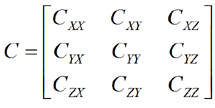
Since it is diagonally symmetric, only six values are necessary to represent the matrix. You can specify the data in either lower-triangular or upper-triangular form using the CovarianceFormat keyword. In the absence of that keyword, the default is upper triangular. The data points following the keyword consist of a line per point where each line looks like the following if you choose the upper triangular format:
<Time in seconds> <CXX> <CXY> <CXZ> <CYY> <CYZ> <CZZ>
or like the following if you choose the lower triangular format:
<Time in seconds> <CXX> <CYX> <CYY> <CZX> <CZY> <CZZ>
where
<TimeInSeconds>
|
The time value of the point in seconds (in the format xxxx.xxx) relative to the epoch as defined by the ScenarioEpoch keyword |
<Cxx>
|
Value (in meters squared) of the corresponding element of the covariance matrix |
You must follow certain conventions when specifying data points.
An ephemeris file using the CovarianceTimePos format looks something like this sample file.
CovarianceTimePosVel Format
This format is the same as the CovarianceTimePos format except that it gives position/velocity covariance:
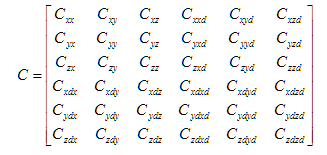
You must provide 21 matrix entries. The required unit for a matrix entry depends on whether it is a product of two positions (e.g., <xy>), a position and a velocity (e.g., <xdy>, <xyd>) or two velocities (e.g., <xdyd>):
| Entry Type | Required Unit |
|---|---|
<xy>
|
meters^2 |
<xdy>, <xyd>
|
meters^2/sec |
<xdyd>
|
(meters/sec)^2 |
If you set CovarianceFormat to LowerTriangular, data points appear as follows:
<Time in seconds> <Cxx> <Cyx> <Cyy> <Czx> <Czy> <Czz> <Cxdx>
<Cxdy> <Cxdz> <Cxdxd> <Cydx> <Cydy> <Cydz> <Cydxd>
<Cydyd> <Czdx> <Czdy> <Czdz> <Czdxd> <Czdyd> <Czdzd>
If you set CovarianceFormat to UpperTriangular, data points appear as follows:
<Time in seconds> <Cxx> <Cxy> <Cxz> <Cxxd> <Cxyd> <Cxzd> <Cyy>
<Cyz> <Cyxd> <Cyyd> <Cyzd> <Czz> <Czxd> <Czyd>
<Czzd> <Cxdxd> <Cxdyd> <Cxdzd> <Cydyd> <Cydzd> <Czdzd>
StateErrorTransition Format
You must use one of the other ephemeris formats in conjunction with this format. You can include an ephemeris format, a covariance format, and the state-error transition format in one file.
The ephemeris file format enables you to supply linear state-error transition matrix data in addition to position and velocity information. Use the StateErrorTransition keyword to indicate that data points that follow are the state-error transition matrices in the same Cartesian coordinate system in which the ephemeris is defined. The number of state-error transition points is restricted to being the same as the number of ephemeris points, and the times associated with the state-error transition matrices should be the same as the times associated with the ephemeris information.
The state-error transition matrices are defined to provide a linear mapping of small deviations in position and velocity. They are represented from the epoch specified via the StateErrorTransitionReferenceEpoch header keyword to the time specified with the matrix. Express both input and output state deviations in the same coordinate system specified for the ephemeris data. Typically, the linear state-error transition matrix is computed through the numerical integration of the variational equations during the numerical integration of the nonlinear trajectory.
The data points following the keyword consist of a matrix per point. Each matrix looks like the following:
<Time in seconds> <PhiXX> <PhiXY> <PhiXZ> <PhiXXd> <PhiXYd> <PhiXZd>
<PhiYX> <PhiYY> <PhiYZ> <PhiYXd> <PhiYYd> <PhiYZd>
<PhiZX> <PhiZY> <PhiZZ> <PhiZXd> <PhiZYd> <PhiZZd>
<PhiXdX> <PhiXdY> <PhiXdZ> <PhiXdXd> <PhiXdYd> <PhiXdZd>
<PhiYdX> <PhiYdY> <PhiYdZ> <PhiYdXd> <PhiYdYd> <PhiYdZd>
<PhiZdX> <PhiZdY> <PhiZdZ> <PhiZdXd> <PhiZdYd> <PhiZdZd>
where
| Option | Description |
|---|---|
| TimeInSeconds | The time value of the point in seconds (in the format xxxx.xxx) relative to the epoch as defined by the StateErrorTransitionReferenceEpoch keyword |
| Phixy | Entry providing mapping of deviation in y coordinate at the reference epoch to the x component at the epoch indicated by TimeInSeconds |