Minerva
The Ansys Minerva® application is an enterprise-level simulation process and data management system that enables your engineers to share, collaborate on, and reuse your Ansys Systems Tool Kit® (STK®) application data across your teams and organizations. The Minerva application provides a central data repository that you can access seamlessly from within the STK application through standard file loading and saving operations and provides the STK application with the capability of searching within and managing the data stored there. For more information, see the Minerva product page.
The best practice for saving STK scenario files to the Minerva system is through the STK application GUI. Copying files directly through the Minerva web interface could lead to loss of dependencies that would cause them to not work properly.
Connecting to the Minerva application
You can define new Minerva application connections and manage them on the Data Services page of the Edit > Preferences window.
Establishing Minerva application access
To access and store scenarios with the Minerva application, you must first execute the following steps:
- Ask your Minerva administrator for an account.
- Sign in to the Minerva server.
- Click your user icon to display a shortcut menu.
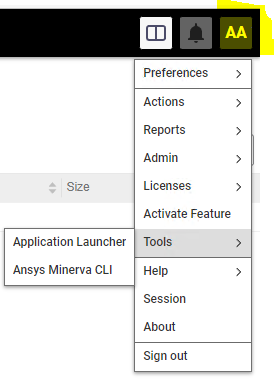
- Select Tools > Ansys Minerva CLI.
- Download and install this client application; you need administrative privileges to do so. This will automatically set up an environment variable that will alert the STK application to make your Minerva server available as an option for a storage (Save) and retrieval (Open) location. You may need to restart your computer for the environment variable to take effect.