Appendix B - Date Handling
When importing data, Test and Evaluation Tool Kit will attempt to use the highest level of precision available. By default, STK will round times to six decimal places. If your data has additional precision, it will be necessary to define the system environment variable NO_EPSEC_ROUNDING. The presence of this environment variable informs STK that epoch seconds should not be rounded to six decimal places.
STK will accept dates with up to nine decimal places of time precision. In order to reduce floating point comparison issues, we recommend a maximum of seven decimal places
Defining this environment variable will require Administrator permissions.
- Using the Windows Start Menu, search for 'Environment' and click on the Edit the System Environment Variables menu item.
- On the Advanced tab, click the button labeled Environment Variables
- Click the New button under the System Variables list
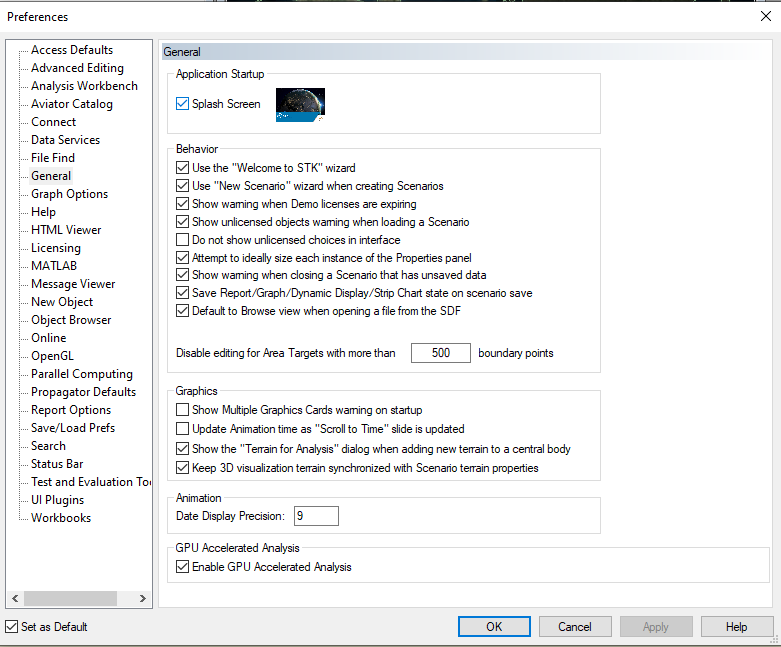
- Enter NO_EPSEC_ROUNDING in the Variable Name field.
- Enter 1 in the Variable Value field. (The value is unimportant, but Windows will not allow you to click OK without a value).
- Click the OK button to close the New System Variable dialog
- Click the OK button to close the Environment Variables dialog.
- If you had STK open, please close and restart for the changes to take effect.
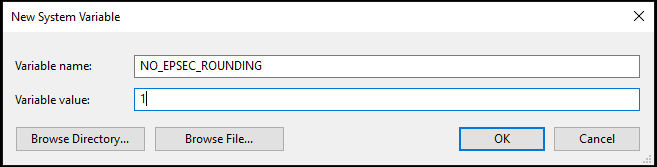
Additionally, when animating scenarios containing high precision times, it is necessary to set the animation display preference to show the full time value. Use STK's Edit -> Preferences menu and select the General section. Enter the desired precision in the Date Display Precision field.