Key Features of Astro Scheduler Engine
The following are some of the key features of Astro Scheduler Engine:
- Fully Integrated with Systems Tool Kit (STK)
- Integrated Gantt and Histogram Charts
- Configurable Figure of Merit
- Multiple Scheduling Algorithms
- Independent Schedule Validation
- Powerful Tools for Interfacing with Other Systems
- Supports Dynamic Scheduling
- Runs as a Windows Service
Fully Integrated with Systems Tool Kit
Astro Scheduler Engine> is a fully integrated, add-on module for Systems Tool Kit (STK). This means that you can use the scenarios that you have defined in STK as the basis of defining your scheduling problem in Astro Scheduler Engine. You can ingest objects from you scenario such as satellites, facilities, area targets, etc. to be the resources for your schedule. Astro Scheduler Engine has the ability to ingest reports such as access reports, lighting reports, orbital events reports, etc. from STK to define resource availability times and task scheduling times.
Integrated Gantt and Histogram Charts
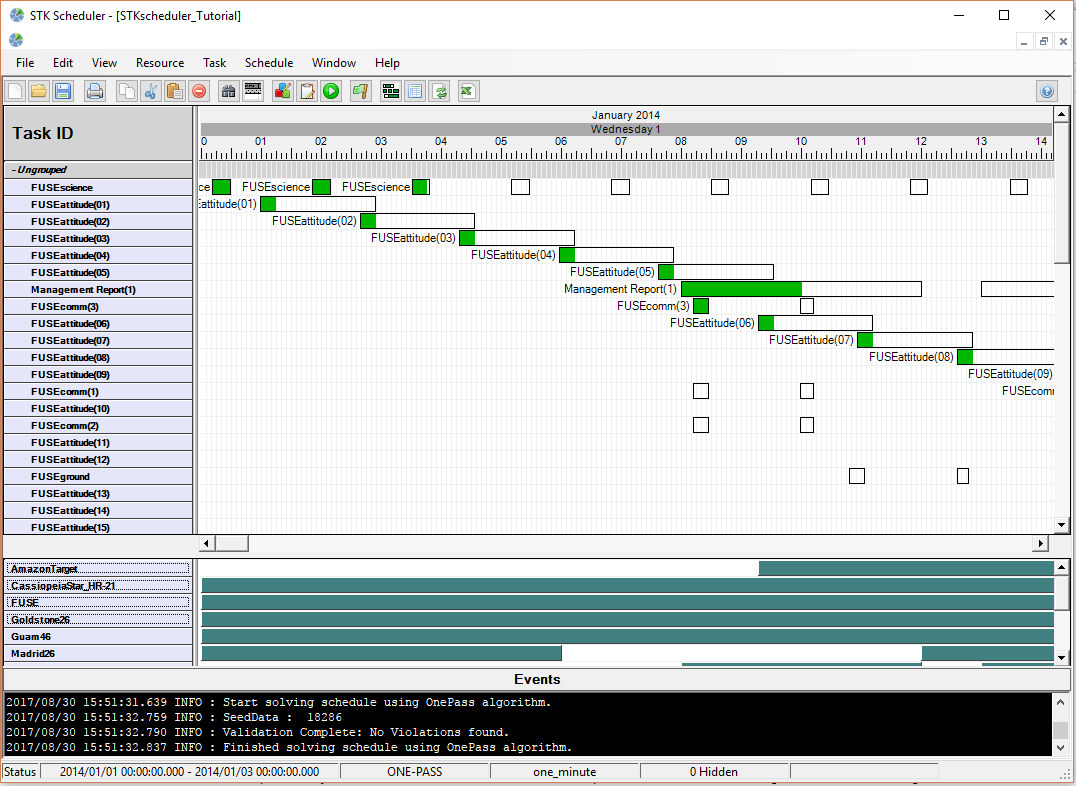
Astro Scheduler Engine uses a series of graphics tools designed to communicate information about your tasks and resources in a clear and concise manner. The Gantt chart is at the heart of Astro Scheduler Engine. On this display you will see information about all of your tasks including: task status information, scheduled task time, time when the task could be scheduled, and more. The Gantt chart has a multitude of user-configurable attributes that allow you to display only the required information and display it in the manner you need.
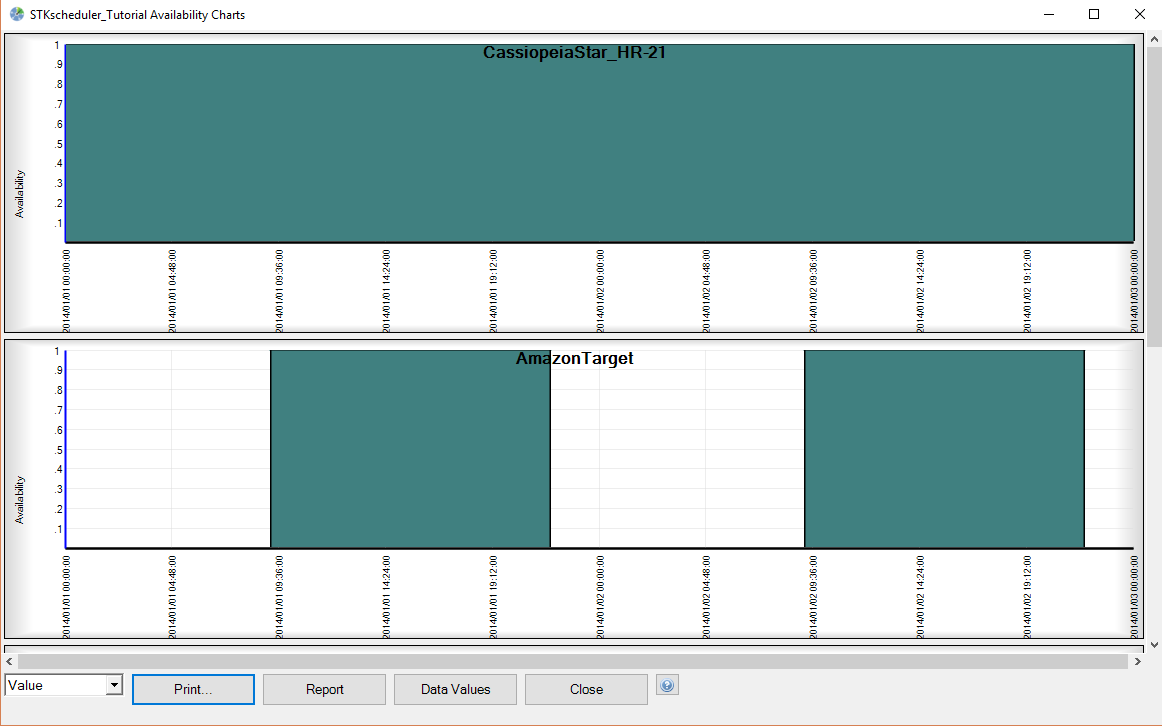
Histogram charts are also used extensively in Astro Scheduler Engine. These charts communicate the various time-dependent values associated with the resources you define. As with the Gantt charts, histograms in Astro Scheduler Engine may be manipulated to serve your needs.
Configurable Figure of Merit
Astro Scheduler Engine not only deconflicts your schedule, it also optimizes it. For any one scheduling problem, there may be more than one deconfliction solution, and one person's optimization schedule may not be another's. For this reason, Astro Scheduler includes a configurable Figure of Merit (FOM) calculation. This calculation enables Astro Scheduler Engine to determine a deconflicted solution that best matches your needs. By changing the weight values of the FOM equation, you may define the relative importance of various attributes of the final solution.
Such attributes include:
- The importance of scheduling tasks with higher priorities
- The importance of scheduling tasks with longer durations
- The importance of scheduling as many tasks as possible
- The importance of scheduling tasks as early as possible
- and more...
Astro Scheduler's configurable Figure of Merit insures not only that you will get an optimized schedule, but an optimized schedule that is customized to your needs.
See Figure of Merit for a complete description.

Multiple Scheduling Algorithms
Astro Scheduler Engine offers unparalleled flexibility for deconflicting and optimization schedules. There are many different types of scheduling problems. Any of these problems can run the range of complexity. For this reason, Astro Scheduler Engine offers a number of different scheduling algorithms from which to select. Each one has its own strengths for solving particular types of scheduling problems, and each one will produce a deconflicted and optimized schedule. Also, the availability of a number of different algorithms allows you to make his own trad-off between time and performance. And, don't worry if you think you might have selected the wrong one. At anytime you can simply select a different algorithm and run it again.
Click here for a description of each scheduling algorithm.

Independent Schedule Validation
The schedules you create may be used to control valuable and, very likely, expensive resource. There can be no tolerance for a schedule that will cause a conflict. Because of this, Astro Scheduler Engine includes an independent schedule validation routine that will work for you in two ways:
First, it ensures that the scheduling engine has created a schedule that is truly deconflicted. Once the schedule engine completes its job, the validation routine automatically validates the schedule. If there is a problem, you will be told in a multitude of places that there is a problem and exactly what that problem is. We don't expect that you will ever need this feature. The scheduling engines used in Astro Scheduler Engine are subjected to exhausting testing to ensure that they will never create a bad schedule. Yet, you can rest assured that the independent schedule validation is working to protect your resources.
Secondly, scheduling validation will notify you if you have manually defined an attribute that will cause a conflict. If needed, you may choose to manually schedule tasks or modify the times that task are scheduled, thereby bypassing the scheduling engine. Whenever this is done, the independent schedule validation will inform you if a conflict has been created. You may choose to ignore the warning and leave the schedule in conflict, make changes to fix the conflict, or simply use the scheduling engine to deconflict the schedule automatically.
Click here for more information on Schedule Validation.
_23x21.png)
_23x21.png)
_23x21.png)
Powerful Tools for Interfacing with Other Systems
Astro Scheduler Engine is designed to operate as a complete, stand-alone solution or as an integrated component of a system. To serve the latter need, Astro Scheduler Engine has a series of powerful and flexible tools that allow it to conform to the needs of your system.
These include:
- ASCII File Ingests
- Computer-friendly reports
- Command File Ingest Feature
- Application Program Interface
ASCII File Ingest
While defining resources and tasks in Astro Scheduler, there are many places where you may define windows of time to describe attributes such as when a resource is available to be scheduled and when a task may be scheduled. At each of these places, you may optionally ingest windows of time from an ASCII file. If you have another system that can create these constraining times, they can be electronically imported into Astro Scheduler Engine, saving time and eliminating the risk of errors.
Computer-friendly reports
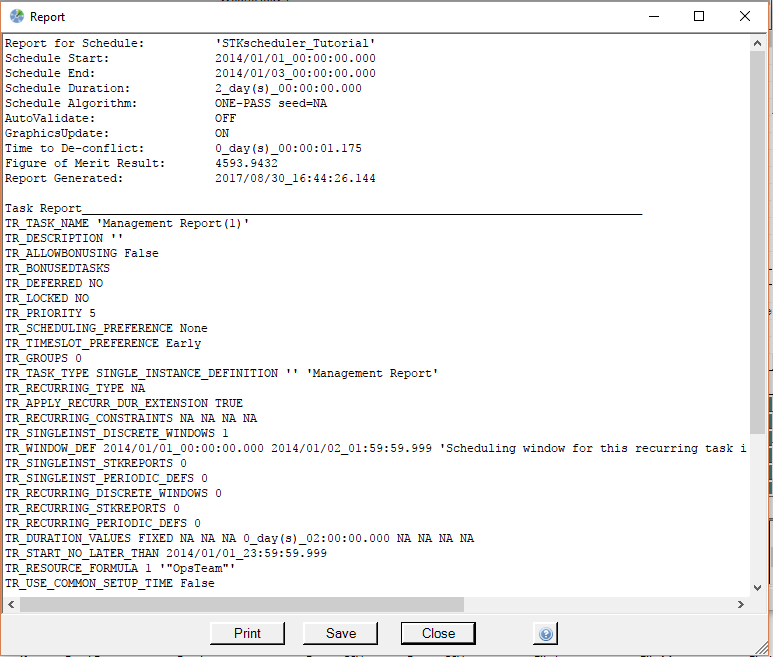
Astro Scheduler Engine can create a number of reports describing resources, tasks, and deconflicted solutions. These reports are formatted in a way that makes them easy to parse using your custom code. Reports are then saved in ASCII format. This way the outputs of Astro Scheduler Engine may be used as inputs to your systems.
Command File Ingest Feature
The majority of the functions o Astro Scheduler Engine (barring those that change the display characteristics) can be controlled via an extensive set of commands. These commands can be placed into an ASCII file. From within Astro Scheduler Engine, you may ingest this file, thereby causing each of these commands to execute in rapid, sequential order. Using this feature, you may create scripts of commands that may be run as often as necessary. This is specially useful when Astro Scheduler Engine is used in a routine manner to create schedules.
Click here for a complete list of commands.
API
Astro Scheduler Engine has within it a powerful API that allows the features of Astro Scheduler Engine> to be manipulated programmatically from your custom applications. The API uses the same commands as the Command File Ingest Feature (above). The help files include a library of commands and examples of their use, as well as examples of the code that is necessary to quickly get you up and running. With this feature, Astro Scheduler Engine> can be fully integrated into your system to create a seamless and automated scheduling tool. Both direct COM interface and a socket interface via STK are supported.
Click here for more details.
Supports Dynamic Scheduling
Often times we plan to use our resources to complete tasks at certain times, but for reasons outside of our control, plans do not always translate directly to reality. Because of this, Astro Scheduler Engine contains tools to support Dynamic Scheduling. Dynamic Scheduling is a planning method where the results of reality are incorporated into future plans. Astro Scheduler Engine contains two features that allow this ability, locking tasks and sliding scheduling periods.
Locking Tasks
Any task that is scheduled may be locked. While a task is locked, its scheduled time will not be changed whenever the deconfliction engine is running. If a task needs to be re-scheduled, simply lock all of the other tasks and run the scheduling engine again. The unlocked task will be re-scheduled without changing the scheduled times of any of your tasks. The API TaskLock command provides options to lock tests of tasks based on task priority, time windows, group memberships, and other attributes supporting convenient dynamic tasking solutions.
Sliding Scheduling Periods
Scheduling periods define the temporal jurisdiction of Astro Scheduler Engine; tasks will not be scheduled outside of these boundaries. At any time, you may change the scheduling period. All of the attributes of the resources and tasks that you have defined will automatically be applied to the new scheduling period. This way, if your schedule must be deconflicted again in the future, the scheduling period may be changed so that tasks won't get scheduled in the past.
 Tab.png)
Run as a Windows Service
The Astro Scheduler Engine> application can be installed to run as a Windows Service in the background. Running as a service allows users to interact with the application through API's without the need for the Astro Scheduler Engine interfaces.
See Astro Scheduler Engine as A Service for a complete description.